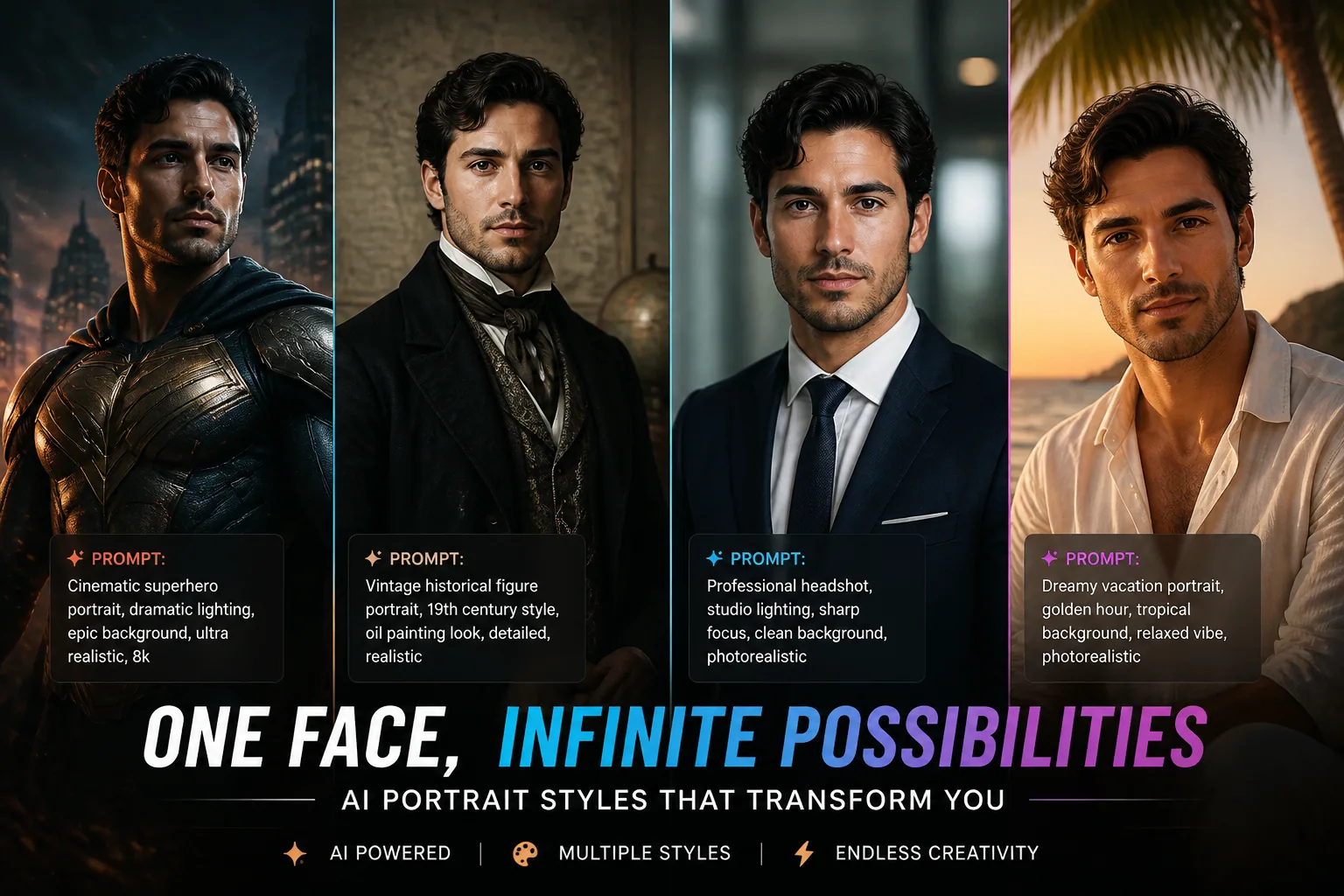
Mastering AI Portrait Prompts: How to Make Your Selfie Look Incredible Across Every Style
If your AI portraits keep coming out generic, overly smooth, or strangely inconsistent, the problem is usually not the model alone. It is often a mix of weak source selfies and vague prompting. The good news is that both parts are fixable. When you upload better selfies and write more specific prompts, AI can create portraits that look more polished, more expressive, and much closer to your actual face.
In this guide, we will go through the full process of getting better AI-generated portraits from your selfies. You will learn why varied uploads matter, how to describe lighting and pose like a photographer, and how to adapt prompts for historical, superhero, vacation, and professional styles without losing your identity in the process.
Why Your AI Selfies Keep Looking Generic
Most generic AI portraits happen for one simple reason: the model does not have enough useful information to understand your face. If you upload just one or two selfies with the same angle, same lighting, same expression, and same background, the system has very little to learn from. It may produce images that look polished at first glance, but they often repeat the same facial structure, same pose, and same mood over and over.
The issue gets even worse when the input photos are low quality or heavily edited. Filters can alter skin tone, face shape, and eye detail. Shadows can hide jawline and cheek structure. Glasses, hats, and extreme expressions can block the features the AI needs most. In other words, the model is not just learning you. It is also learning the distortions in your photos.
That is why strong AI portraits begin before you ever write a prompt. The right selfie set gives the model a clean, varied reference for your real features, which makes every style look more natural and identity-preserving.
The Hidden Secret: Better Uploads Make Better Portraits
One of the most useful rules for better AI headshots is to upload a set of 8 to 15 recent, high-quality selfies with variation. According to ProShoot, a varied set of selfies with different lighting, poses, angles, expressions, and backgrounds helps AI learn your real face shape and reduces repetitive or same-look output: https://www.proshoot.co/blog/what-kind-of-photos-work-best-for-ai-headshots
That number matters because the model needs enough examples to identify stable facial traits. A front-facing shot shows symmetry. A slight angle shows profile depth. A smile reveals how your cheeks and eyes move together. A neutral expression helps the system understand resting facial structure. When those details are combined, the AI can build a stronger personal likeness.
You do not need a professional photo shoot. You do need variety. Think of it as teaching the model your face from multiple angles, not just handing it one highly polished version of you. The more balanced the input, the more adaptable the output becomes across different styles.
How Lighting, Angles, Expressions, and Backgrounds Train the AI to Recognize You
Lighting is one of the most important parts of your selfie set. Natural, soft lighting is consistently better than harsh overhead light or mixed indoor light. SelfAI Photo recommends facing a window directly and using diffused or indirect sunlight, because this helps capture true skin tone and texture: https://www.selfaiphoto.com/blog/selfie-tips-for-ai-headshots
That advice is valuable because the model uses lighting cues to understand facial contours. Soft light makes it easier to see the natural shape of your nose, lips, and cheeks. Harsh light can create deep shadows that obscure those features. If your goal is accurate portraits, aim for clean, even light and avoid dramatic contrast in your source selfies unless the look is intentional.
Angles and expressions also teach the AI a lot. A slight upward angle can emphasize the jawline, while a side angle can reveal facial depth and hairstyle. A relaxed smile, a neutral expression, and a small laugh all help the model understand the range of your features. Backgrounds matter too, but mostly for clarity. Simple settings are usually best because clutter can distract from the face. The goal is to make you the focus, not the room behind you.
If you want the model to preserve your likeness, avoid photos with face-obscuring accessories, heavy filters, or extreme expressions. ProShoot specifically warns that glasses, hats, shadows, and strong filters can distort features and reduce identity-preserving detail: https://www.proshoot.co/blog/what-kind-of-photos-work-best-for-ai-headshots
The Anatomy of a Great AI Portrait Prompt
A strong AI portrait prompt does more than name a style. It gives the model a visual plan. The best prompts usually include five elements: subject description, lighting, texture, mood, and technical guidance. If you only say “beautiful portrait” or “nice lighting,” the AI has too much freedom and too little direction.
A strong prompt might mention age range, expression, wardrobe, camera angle, lens type, depth of field, and skin texture. It might also specify the background, the atmosphere, and the kind of color grading you want. These details help the model render a portrait with structure rather than guesswork.
For example, portrait realism improves when you include details like natural skin texture, visible pores, subtle imperfections, and realistic eye detail. PicassoIA notes that these small cues, including catch-lights, iris detail, visible eyelashes, and a moist lower lid, make portraits feel much more believable: https://blog.picassoia.com/how-to-generate-portraits-that-look-real and https://blog.picassoia.com/how-to-make-ai-selfies-that-look-real
The point is not to overwhelm the prompt with jargon. The point is to guide the AI toward the look you actually want. A good prompt gives the model enough structure to be precise, but enough creative room to remain stylish.
Style-Specific Prompting: Historical, Superhero, Vacation, and Professional Looks
Different portrait goals need different vocabulary. A professional headshot should feel clean, trustworthy, and polished. A historical portrait should feel authentic to its era. A superhero image should feel cinematic and powerful. A vacation portrait should feel relaxed, sunlit, and aspirational. If you use the same prompt structure for all of them, the results can feel bland or off-theme.
For historical portraits, be specific about the era. Retro and vintage prompts work best when they reference a decade, film style, and wardrobe details. RobotBuilders recommends terms like 1920s, 1950s Kodachrome, film grain, warm or faded color cast, analog textures, and period-appropriate props to create authenticity: https://robotbuilders.net/best-prompts-for-vintage-retro-ai-generated-photos/
For superhero portraits, the prompt should shift toward dramatic composition, structured costume language, and energetic lighting. Think bold stance, powerful silhouette, cinematic backlight, and dynamic contrast. You want the image to feel like a poster frame, not just a person in a costume.
For vacation portraits, the scene should breathe. Add tropical beach, golden sunlight, relaxed pose, soft wind, ocean background, and natural smile if you want a warm, airy result. For professional portraits, keep the focus on crisp wardrobe cues, studio lighting, clean background, and confident but approachable expression.
Keywords That Change Everything: Lighting, Mood, Lens, Color, and Pose
The right keywords can make a massive difference because they shape how the AI interprets the entire image. Lighting is one of the most powerful. IndieGTM recommends specifying lighting patterns such as Rembrandt, loop, or butterfly, plus direction like 45 degree key light from left, quality such as soft or hard, and modifiers like rim light or fill light: https://indiegtm.com/tools/portrait-photography-studio-prompt/
That level of detail helps the model create depth and realism. A soft window-lit portrait feels different from a Rembrandt-lit portrait, even if the face and outfit are the same. Mood keywords matter too. Calm, confident, romantic, heroic, editorial, nostalgic, and serene all push the composition in different directions.
Lens and camera cues also matter more than most people realize. PicassoIA recommends 85 mm lenses at f/1.4 to f/1.8 for classic flattering portraits, while wider lenses like 28 to 35 mm are better when you want environmental context or intentional distortion: https://blog.picassoia.com/how-to-make-ai-selfies-that-look-real
Color grading is another major lever. If you want a cinematic result, ask for golden hour backlight, soft cinematic glow, volumetric light rays, bokeh, and 4K detail. Seedory points out that these cues can dramatically improve the richness and realism of portrait outputs: https://seedory.cc/blog/best-ai-image-prompts-for-portraits
Pose direction is often overlooked. Terms like three-quarter view, seated posture, head turned slightly toward camera, relaxed shoulders, and chin slightly down can keep the portrait from looking stiff. The best AI portraits usually feel posed, but not frozen.
Weak Prompt vs Strong Prompt: Real Before-and-After Breakdowns
Weak prompts are usually vague, generic, and style-light. They ask for results without telling the AI what to build. Strong prompts describe the face, the lighting, the texture, the environment, and the mood. That difference is often the difference between an average image and a portrait that actually feels usable.
Weak prompt: nice portrait of me in a stylish outfit with good lighting.
Strong prompt: photorealistic portrait of a woman in her 30s with natural skin texture, visible pores, soft freckles, and detailed eyes, standing in soft window light from camera left, wearing a tailored cream blazer, shot with an 85 mm lens at f/1.8, shallow depth of field, subtle catch-lights, neutral studio background, confident expression, editorial quality.
The strong prompt works because it gives the AI a roadmap. It tells the model how to light the face, how to shape the skin, what wardrobe to include, how to blur the background, and what emotional tone to create. The image will usually look more coherent because the instructions are visually specific rather than abstract.
You can apply the same principle to any style. Instead of saying “me as a superhero,” describe the suit, lighting, stance, and cinematic feel. Instead of saying “a vacation photo,” specify the location, sunlight, fabric movement, and relaxed expression. The more concrete the prompt, the more repeatable the result.
Prompt Templates You Can Reuse for Any Portrait Style
Once you understand the structure, you can reuse a basic formula across almost any portrait type. The easiest template is: subject plus facial realism plus lighting plus wardrobe plus environment plus camera plus mood. That formula gives the AI enough information to generate something stylized without losing resemblance.
Template for a polished portrait: photorealistic portrait of [subject description], natural skin texture, detailed eyes with realistic catch-lights, [lighting pattern and direction], [wardrobe], [background], shot with [lens] at [aperture], [mood], high detail, balanced composition.
Template for a historical look: [era] inspired portrait of [subject description], period-accurate wardrobe, subtle film grain, warm or faded color grading, analog texture, authentic props, soft directional lighting, natural skin texture, [mood], cinematic framing.
Template for a superhero look: cinematic superhero portrait of [subject description], powerful stance, dramatic costume details, strong rim light, moody backlight, atmospheric background, intense expression, high contrast, sharp facial detail, poster-like composition.
Template for a vacation look: relaxed travel portrait of [subject description], sunlit tropical setting, soft breeze, natural smile, light summer outfit, warm golden hour glow, shallow depth of field, vibrant but realistic color grading, candid lifestyle feel.
How to Keep Results Stylized but Still True to Your Face
The hardest part of AI portraits is not making them look stylized. It is making them look stylized without losing identity. The trick is to separate what should change from what should stay stable. Clothing, background, color tone, and atmosphere can transform dramatically. Core facial structure, eye shape, and overall likeness should remain consistent.
This is where your source selfies matter again. If you give the model a reliable face reference, then the style instructions can do their job without overpowering your features. Use prompt language that keeps the face grounded, such as preserve likeness, realistic proportions, natural skin texture, and identity-preserving detail.
You can also reduce distortion by avoiding overly aggressive style words when you do not need them. Excessive surrealism, ultra-plastic skin, hyper-fantasy makeup, or exaggerated facial reshaping can make the portrait look less like you. Strong style is good. Uncontrolled style is not.
The goal is not to erase your face inside the concept. The goal is to place your face inside a well-designed visual story.
Common Mistakes That Flatten or Distort AI Portraits
There are a few recurring mistakes that cause portraits to look flat, fake, or inconsistent. The first is uploading too few selfies or using only similar angles. The second is relying on filtered, low-light, or heavily edited images that hide important facial details. The third is writing prompts that are too short to guide composition.
Another common mistake is forgetting skin and eye realism. Over-smoothed skin can make the output look plastic. Missing catch-lights, vague iris detail, and unrealistic eyelashes can make the eyes feel dead or synthetic. If your portraits feel uncanny, this is often the first place to look.
Technical mismatch is another issue. If you ask for a dramatic studio portrait but include casual beach words, the model may split the difference and give you a confused result. The more internally consistent your prompt is, the more coherent the image will be. Also, avoid stuffing the prompt with too many unrelated style cues. Clarity usually beats quantity.
Finally, do not ignore the relationship between the photo set and the prompt. If the selfies suggest one identity and the prompt pushes another, the result may feel unstable. The best outputs happen when the source photos and the prompt are working toward the same visual goal.
A Simple Workflow for Consistently Better AI Selfie Results
A reliable workflow makes all of this much easier. Start by collecting 8 to 15 clear selfies with varied angles, expressions, lighting, and backgrounds. Make sure the images are recent and not overly filtered. Keep the face visible, the light soft, and the details clean.
Next, choose the style you want. Decide whether you are going for professional, vacation, superhero, historical, or something custom. Then build the prompt around that theme using specific words for lighting, lens, mood, wardrobe, and texture. If the style is cinematic, lean into glow, shadow, and atmosphere. If it is professional, lean into clarity, balance, and polished presentation.
After the first generation, compare outputs and look for patterns. If the skin is too smooth, add natural skin texture and visible pores. If the eyes look lifeless, add detailed eyes with realistic catch-lights. If the pose feels stiff, add relaxed shoulders or a subtle head turn. If the style feels too weak, strengthen the wardrobe and lighting language.
This cycle of upload, prompt, evaluate, and refine is how you get consistently better results instead of random lucky ones.
Final Prompt Checklist Before You Generate
Before you hit generate, make sure your selfie set is varied and high quality, your face is clearly visible, and your lighting is as natural as possible. Then check that your prompt includes a clear subject description, a specific style, realistic skin and eye details, lighting direction, wardrobe cues, mood, and camera guidance.
If you want an easy way to put all of this into practice, Selfie AI: AI Photo Generator can help turn a few selfies into personalized portraits across professional, beach, superhero, historical, and custom styles. It is especially useful if you want to experiment with different looks while keeping your likeness consistent: https://findthe.app/selfie-ai-0xi7wd.
A great AI portrait is not just about looking attractive or dramatic. It is about combining identity, realism, and style in a way that feels intentional. With better selfies and better prompts, your AI portraits can move from generic to genuinely impressive.